
Diary
I installed Microsoft Office on my new laptop. It cost only 850 yen. Here’s how I managed to do it:
- Search for a license on Yahoo Shopping. The link is below.
- Purchase the licence.
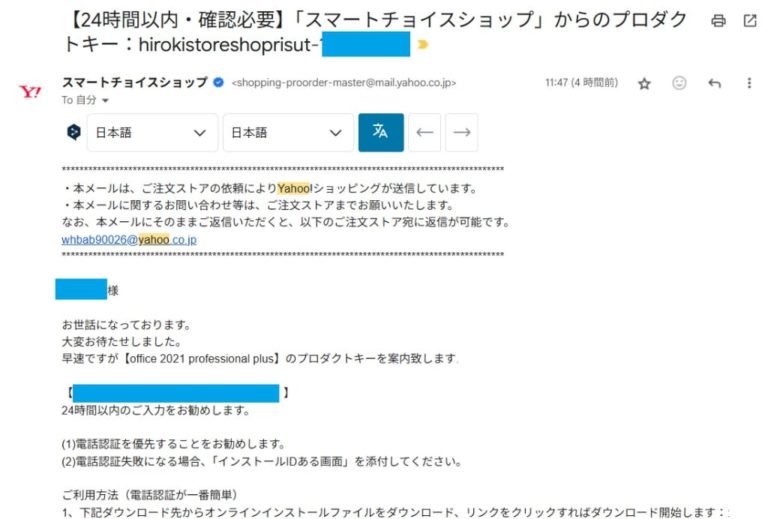
- An email is sent from the seller, explaining how to install it.
- Click the link in the email and download Microsoft Office.
- Install it and open Excel.
- When the activation window pops up, select “Activate by phone.”
- Call the number and follow the IVR instructions; an SMS will be sent to your phone.
- Click the link in the SMS to visit Microsoft’s activation centre website.
- Select your product—Microsoft Office 2021—and enter your confirmation ID in the required format.
- Finally, the activation code is displayed. Enter it in the activation window and confirm.
Although I thought it was suspicious because it was too cheap, it worked properly.
Original statements
I installed Microsoft Office for my new laptop. It costs only 850 yen. I introduce how I could have done.
- Search a selling License on the yahoo shopping online. The link is below.
- Buy the License.
- A email is sent from the seller, which describes how to install it.
- Access the link on the email and download Microsoft Office.
- Install it and open Excel.
- Then activation window pop up, select activate by phone.
- Call the number, and go on with IVR, so SMS is sent your phone.
- Access the link on the SMS, so you visit Microsoft activation center web.
- Then select the product, Microsoft Office 2021, and fill your confirm ID in the format.
- Finally the activation code is displayed, and input it in your activation window, then confirm.
Although I thought it was odd as it was too cheap, but it worked properly.
Explanation of Changes
“It costs only 850 yen.” → “It cost only 850 yen.”
The sentence refers to a completed purchase, so the past tense “cost” is appropriate.
“I introduce how I could have done.” → “Here’s how I managed to do it:”
The original sentence is grammatically incorrect and unclear. The corrected version is a natural way to introduce a procedure.
“Search a selling license on the yahoo shopping online.” → “Search for a licence on Yahoo Shopping.”
The verb “search” needs the preposition “for”.
Proper nouns like “Yahoo Shopping” must be capitalised.
“Licence” is the correct British English spelling for the noun (vs. “license” in American English).
“Buy the license.” → “Purchase the licence.”
“Purchase” is more formal and suitable for written instructions.
Again, “licence” uses British English spelling.
“A email is sent…” → “An email is sent…”
Use “an” instead of “a” before a vowel sound like “email”.
“…which describes how to install it.” → “…explaining how to install it.”
Using “explaining” makes the sentence more fluent and natural. It’s a reduced relative clause.
“Access the link on the email” → “Click the link in the email”
“Click” is more natural and common with links.
“In the email” is the correct preposition.
“Then activation window pop up” → “When the activation window pops up”
Fixed subject-verb agreement (window → pops).
Added “when” for clarity and correct timing.
“so SMS is sent your phone” → “an SMS will be sent to your phone”
Added article “an” and improved grammar and clarity.
“Access the link on the SMS” → “Click the link in the SMS”
“Click” is the proper verb for links.
Correct preposition is “in the SMS”.
“Microsoft activation center web” → “Microsoft’s activation centre website”
Changed to possessive form “Microsoft’s”.
Used British spelling “centre”.
Added “website” to make it more specific and natural.
“fill your confirm ID in the format” → “enter your confirmation ID in the required format”
“Confirmation ID” is the correct and commonly used term.
“Enter” is the proper verb for inputting data.
“Then … input it in your activation window, then confirm.” → “Enter it in the activation window and confirm.”
Removed redundancy.
“Enter” is more commonly used than “input” in this context.
“Although I thought it was odd as it was too cheap, but it worked properly.” → “Although I thought it was suspicious because it was so cheap, it worked properly.”
Removed unnecessary “but” (don’t use both “although” and “but” together).
Replaced “odd” with “suspicious”, which better expresses doubt or concern.